









Turning raw translation-process logs into interactive, export-ready insights — in one open-source package.
If you’ve ever stared at a massive Translog-II XML file wondering “what actually happened during this post-editing session?”, you’re not alone. Translation-process research, post-editing studies, and productivity analytics generate rich data — cursor movements, keystrokes, pauses, segment timings, and even external window activity — but extracting meaningful patterns from it has historically been a painful, manual slog.
Today I’m excited to release the Translog-II Log Parser & Toolkit: a complete, self-contained solution that turns those logs into beautiful, interactive HTML dashboards with zero external dependencies after generation.
(Live demo: Translog Parser | External Activity Parser)
One Repository, Two Powerful Tracks
The toolkit actually contains two tightly integrated analytics engines:
1. Translog-II Parser (app.py)
The heart of the project. Feed it a Translog-II .xml log and it instantly produces a single-file interactive HTML report packed with:
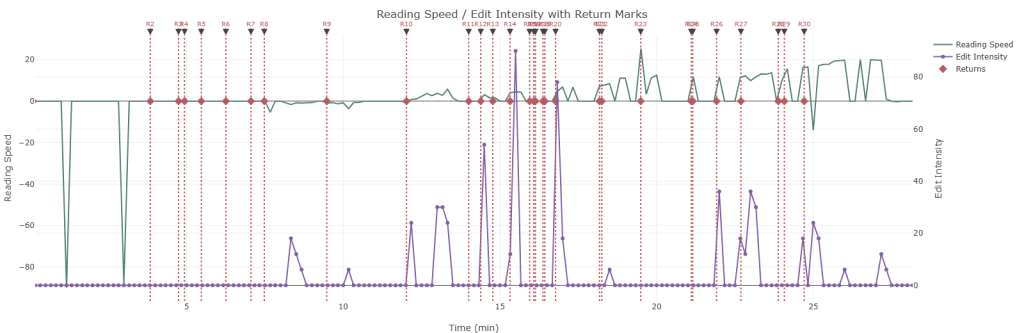
- Time-based trends: Reading speed vs. edit intensity over time, with configurable granularity and revisit-penalty controls.
- Position-based trends: Reading speed vs. edit intensity over text position, with configurable granularity and revisit-penalty controls.
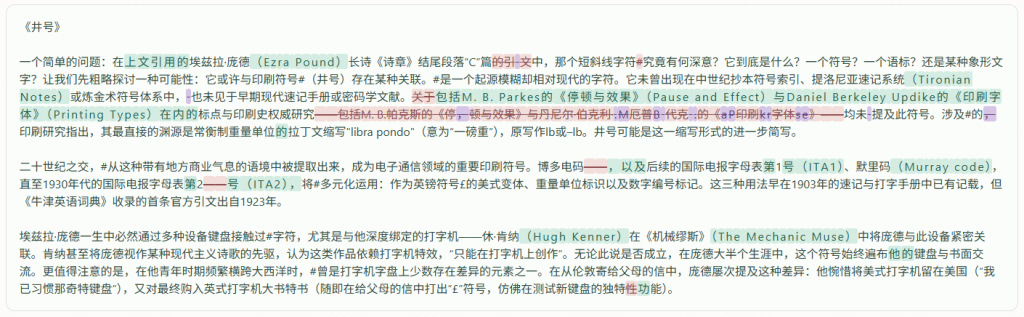
- MT/PE Heat Overlays: Visualise reading and editing activity directly on the source, target, or final text.
- Segment Timeline: Clickable compiled text with MT→PE token colouring, vicinity timing, raw XML inspection, and per-segment pause metrics.
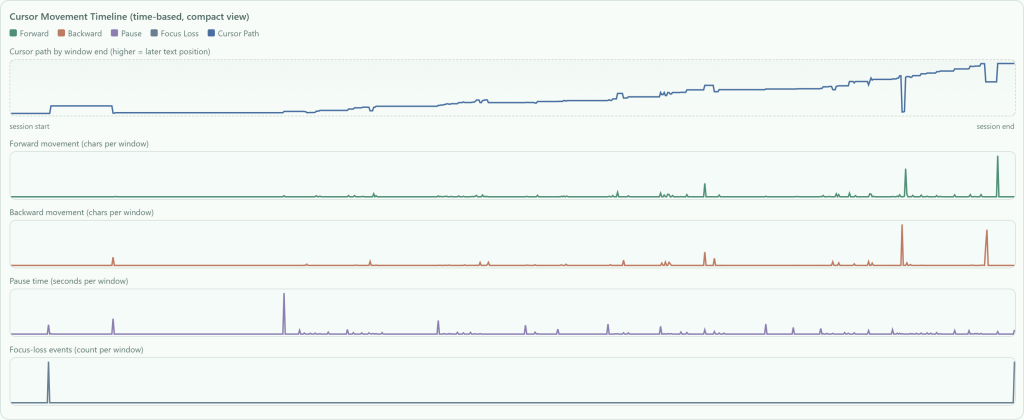
- Cursor Movement Timeline: Forward/backward movement, pause lanes, focus-loss detection, and compare-points mode.
- Powerful Pivot Engine: Dynamic dataset selection, aggregations (count, sum, avg, min, max), quick presets, and conditional CSV enrichment with segment text and raw XML.
Every chart supports PNG + UTF-8-SIG CSV export. The entire report is self-contained (Plotly + html2canvas via CDN) and works offline.
2. External Activity Toolkit
Because real-world translation work rarely happens only inside Translog.
- Recorder (
external_activity_recorder.py): Lightweight Windows tool that silently captures:- Foreground window switches & dwell times
- Optional global keyboard/mouse events
- Browser companion extension events (title, URL, tab switches)
- Parser (
external_activity_parser.py): Turns the recorder’s XML into its own interactive dashboard featuring:- Main-window presence timeline
- Research-time analytics (sessions spent outside the main editor)
- “Left-from-main” return events with optional merging
- Reading/edit intensity trends overlaid with return markers
- Full data export + pivot system (mirroring the Translog parser)
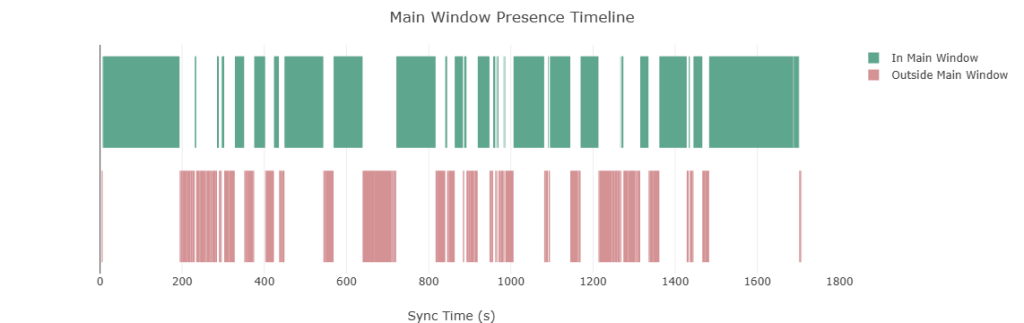
The Example Workflow
Run the recorder while the participant works → generate both dashboards → analyse the complete process:
- See exactly when the translator left Translog to research terminology
- Correlate external research sessions with spikes (or drops) in editing intensity
- Quantify true “in-editor” productivity vs. total session time
Quick Start
# 1. Install
pip install -r requirements.txt

# 2. Translog Parser (GUI)
python app.py

# 3. Or headless
python app.py --headless --xml raw_log.xml --output my_report.html

# External side (optional but recommended)
python external_activity_recorder.py --cli --output external_log.xml
python external_activity_parser.py --cli --external-log external_log.xml --output external_report.htmlWindows is required only for the recorder (due to win32gui). Everything else runs anywhere Python 3.10+ is available.
Designed for Researchers & Engineers
- Fully documented: TECHNICAL_SPECIFICATION.md + XML_PARSING_GUIDE.md + EXTERNAL_ACTIVITY_TECHNICAL_SPEC.md
- Extensible: Clear extension points for new datasets, charts, pause metrics, or pivot presets
- Reproducible: Headless mode + deterministic CSV exports
- Privacy-conscious: Explicit consent reminders and local-only operation
The entire project is licensed under GNU GPLv3 — you’re free to use, modify, and redistribute.
Try It Now
- Live Translog Demo: https://bdzzzz1.github.io/translog-ii-log-parser.github.io/
- Live External Activity Demo: https://bdzzzz1.github.io/external_activity_parser_demo/
- GitHub Repository: https://github.com/BDZzzz1/Translog-ii_Log_Parser_Toolkit
Happy parsing!
Comments | NOTHING