










TeamSpeak (TS thereafter) is a proprietary software for audio communication that operates on multiple clients, underpinning its user coverage across almost all common OSes. Using Voice over Internet Protocol (VoIP, aka IP Telephony), users may connect to either self-hosted or public TS servers, by which usage cases including in-game instant communication, encrypted voice calls and conference calls could be supported.
Why OpenWRT?
Convenient as it may seem, VPSes in the Chinese mainland usually come with exiguous bandwidth limits.
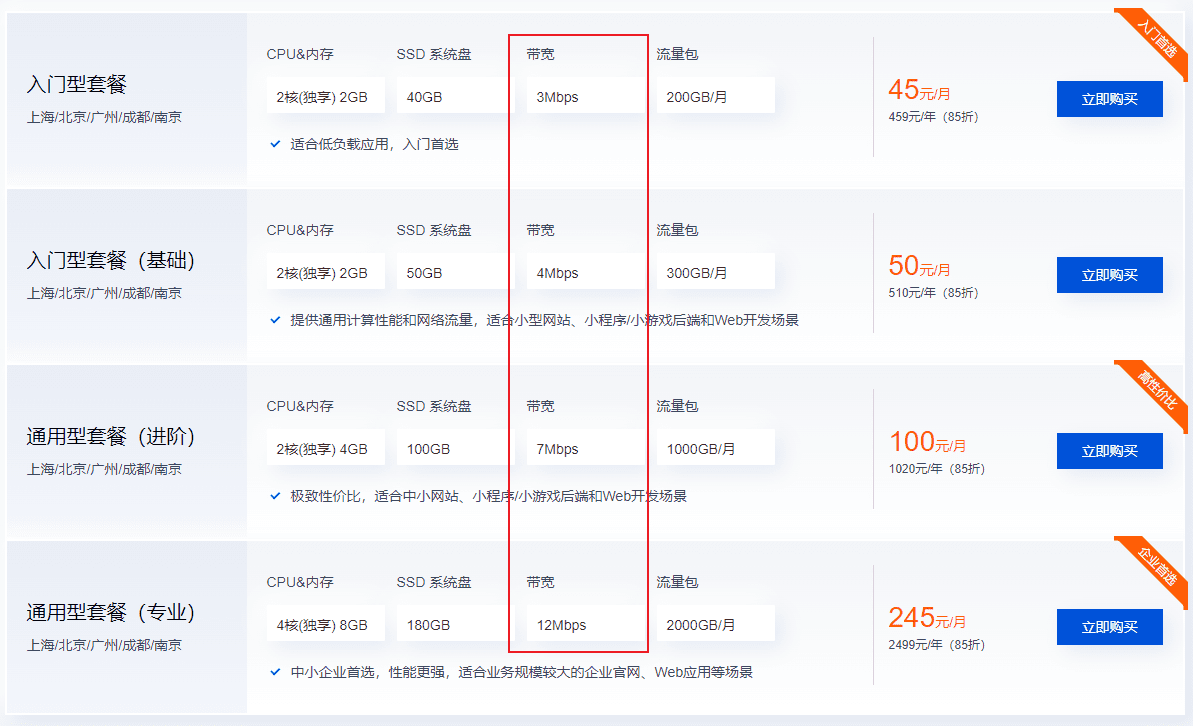
Despite the fact that overseas service providers tend to promulgate plans that allow higher peak bandwidths, on which it is vital for TS servers to rely, their unacceptable high latency for UDP communication negates overseas deployments' position as the first choice. Rather, as regulated by the MIIT, all broadband network users in China that have contracted a download bandwidth higher than 200Mbps shall be allocated with an according upload bandwidth limit of no less than 30Mbps. Combined with the lower latency for domestic network communications, it is within the realm of a high probability that TS servers can be deployed on home servers, where most of which are running on RouterOSes, including OpenWRT, for optimal performances. (FRP services need to be set up for most China Mobile users, though, for CM's dearth of Public IPv4 addresses)
Deployment
Basic Info
Teamspeak Official Website: https://www.teamspeak.com/
TS 3 Server-Arm Github: A TS3 Server Configured for ARM Architectures
Docker Hub: Docker image of the project above
How to Setup
Run the following command:
docker run -d --name TeamSpeak3_Server -e TS_UPDATE=1 -e TIME_ZONE=Asia/Shanghai -p 9987:9987/udp -p 10011:10011/tcp -p 30033:30033/tcp -v {path}/:/TS3_Server/ ertagh/teamspeak3-server:latest-boReplace TIME_ZONE and {path} to your custom settings. (IANA time zone configurations: Wikipedia)
Remember to open up the following ports in the OpenWRT firewall:
UDP port 9987 for the main voice serverTCP port 10011 for file transfersTCP port 30033 for remote management
Also set corresponding port forwarding correctly if your modem's not running in bridge mode.
Fetching Server Admin Privilege Key
Run the following command:
Docker logs TeamSpeak3_Serverand you should see something like:
2023-08-10 03:12:32.228719|WARNING |TS3Server |1  |-------------------------------
2023-08-10 03:12:32.228719|WARNING |TS3Server |1  |ServerAdmin privilege key created, please use the line below
2023-08-10 03:12:32.228719|WARNING |TS3Server |1  |token=[your privilege key here]
2023-08-10 03:12:32.228719|WARNING |TS3Server |1  |-------------------------------
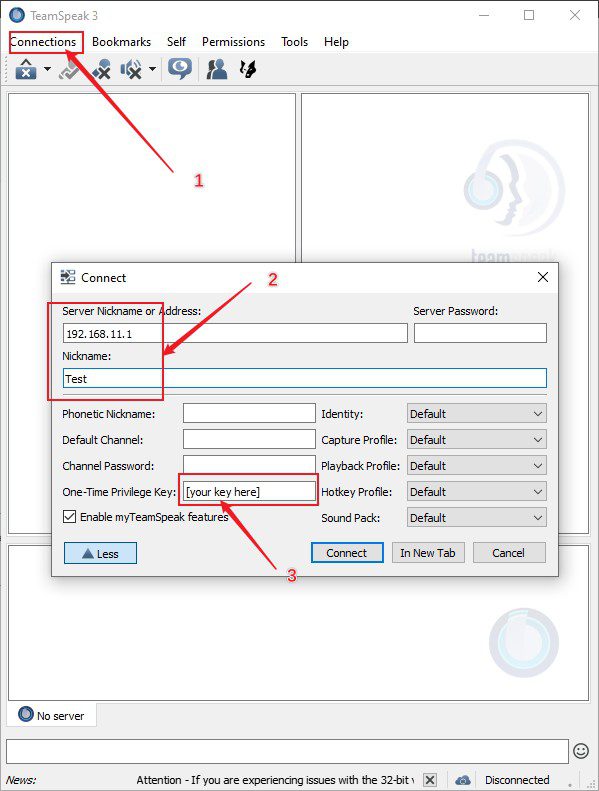
Save the token for later use.
Client Settings
Download a client from TS official website.
Select connect, fill in the info, and it's done:
Further Info
You may check up the proj's environment settings in its github page.
Set up a DDNS URL resolving to your local server to broadcast it to the public.
Comments | NOTHING